
How to Use an AI Financial Advisor for Budgeting: A Practical Guide
Building a budget used to mean spreadsheets, receipts, and a fair amount of guilt. Now an AI financial advisor can turn a plain-English conversation into a working budget in minutes — categorizing your spending, applying a proven framework, and flagging where money quietly leaks out.

This guide walks through how to use an AI-powered budgeting assistant step by step: the 50/30/20 and zero-based frameworks, finding savings, building an emergency fund, and ready-to-copy prompts, plus the guardrails that matter when the subject is your money. Treat the tool as encouraging and practical — it informs the plan, but you decide.
Educational information only — not financial advice, and not a substitute for a licensed financial advisor. Consult a professional before making financial decisions.
What an AI Financial Advisor Actually Does for Your Budget
An AI budgeting assistant isn’t managing your accounts — it’s structuring the numbers you give it. Understanding that boundary early makes the rest of this guide much more useful.
From conversation to a working budget
An AI budgeting assistant takes a plain description of your income and expenses and returns a structured plan: category buckets, suggested limits, and a summary you can adjust in the next message. It’s closer to a planning partner than an autopilot — you steer, it drafts. This kind of use is already mainstream: according to a 2024 Ipsos survey conducted for BMO and reported by CNBC, roughly 37% of Americans already use AI to manage some part of their finances, and creating or updating a household budget was one of the most common reasons people gave.
Unlike a bank-linking app that pulls transactions automatically through a service like Plaid, a conversational AI budgeting assistant usually works from what you type — there’s nothing to connect and nothing sitting in a linked account. That’s slower than an automated tracker, but it also means you control exactly what financial detail the tool ever sees.
What it’s good at — and what it isn’t
An AI financial assistant is genuinely useful for a specific set of tasks:
- Sorting spending into categories
- Explaining budgeting concepts in plain English
- Running “what-if” scenarios (“what if I cut dining out by half?”)
- Drafting the next prompt or step for you to act on
It’s not good at managing your money directly, giving you personalized or licensed advice, or guaranteeing that any number it produces is accurate. For a neutral primer on the basics before you start, the Consumer Financial Protection Bureau’s guide to budgeting is a solid starting point. Setting this boundary early keeps expectations realistic for everything that follows.
Step 1 — Set Up Your AI Budget the Right Way
A budget built on the wrong number is wrong from the start, so the setup step matters more than it looks.
Start with your take-home number and a goal
Use your net, take-home income — what actually lands in your account after taxes and deductions — not your gross salary. Budgeting off gross income overstates what you actually have to work with. Tell the AI your goal up front: “help me save a $1,000 emergency fund” or “help me stop overspending on dining out.” A clear goal gives the AI something concrete to build the structure around, rather than a generic budget you’re unlikely to stick with.
There’s no need to hand over an exact paycheck figure to the last dollar. A rounded number — “about $3,200 a month after taxes” — is both easier to work with and safer to type into a chat window than an exact figure pulled straight from a pay stub.
The four-step setup
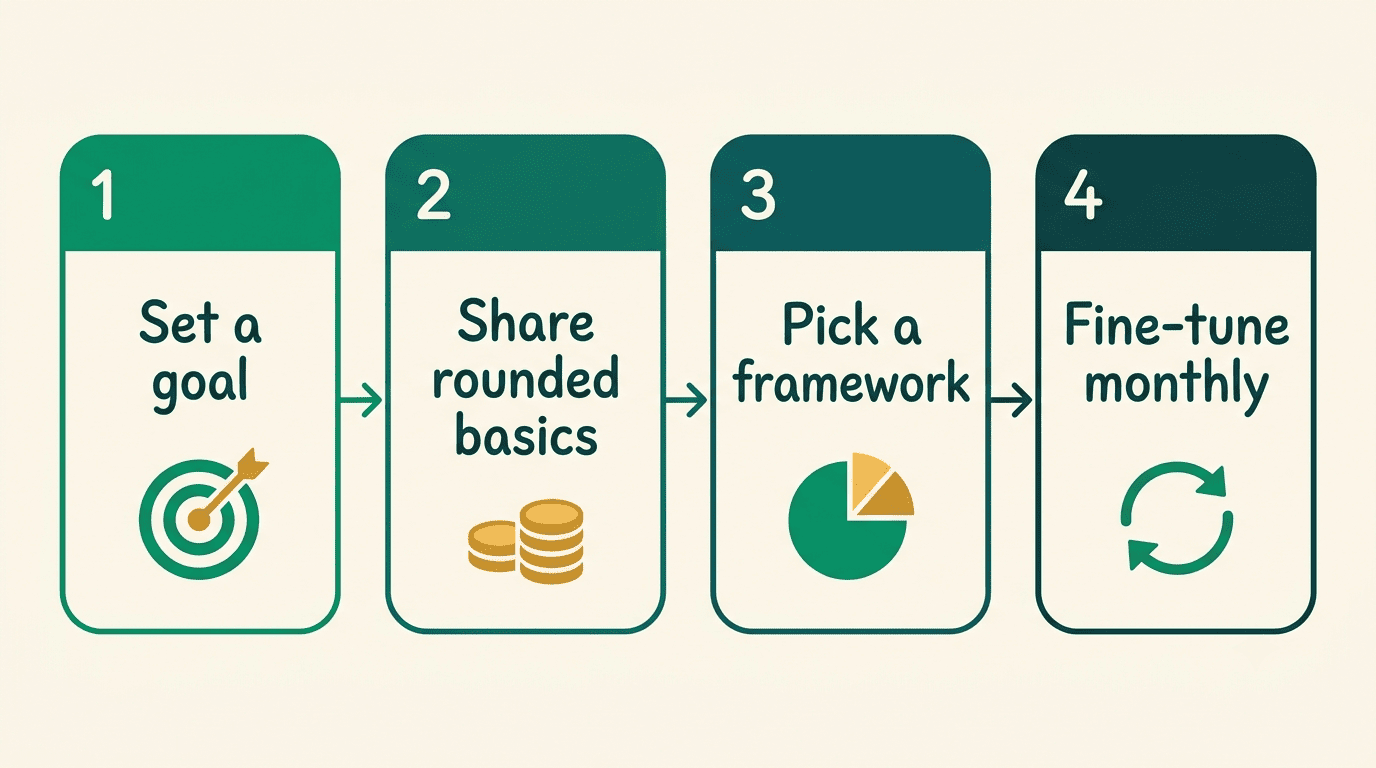
- State your goal in one sentence.
- Share rounded basics: take-home income, big fixed costs, and a rough estimate of variable spending.
- Ask for a specific structure — pick a method (see Step 3 below) rather than leaving it open-ended.
- Fine-tune the draft it returns, category by category.
Treat this as a loop, not a one-shot conversation. Refresh the numbers monthly so the budget tracks your actual life instead of a snapshot from three months ago.
Step 2 — Categorize and Understand Your Spending
Most people don’t lack the discipline to budget — they lack a clear picture of where the money actually goes. This is where an AI-powered financial advisor earns its keep.
Turn messy spending into clean buckets. Group spending into three groups: needs (rent, groceries, utilities, minimum debt payments), wants (dining out, subscriptions, entertainment), and savings or debt paydown. The AI can propose the categories and slot in the rounded amounts you give it — you don’t need to hand over a full statement to get useful structure. A simple prompt works: “I spend about $320 a month on eating out, $60 on streaming subscriptions, and $150 on transport — sort these into needs, wants, and savings.”

Spot patterns and leaks. Ask the AI to surface your biggest discretionary categories and any recurring subscriptions worth a second look. This is pattern-spotting on the summary you’ve already typed in — it never needs, and should never receive, access to a live bank account to do this part of the job.
| Category | Examples | Typical treatment |
|---|---|---|
| Needs | Rent/mortgage, groceries, utilities, minimum debt payments | Fixed priority, funded first |
| Wants | Dining out, streaming, entertainment, hobbies | Flexible, first place to trim |
| Savings/debt paydown | Emergency fund, retirement, extra debt payments | Treated as a required line, not leftovers |
Step 3 — Pick a Framework: 50/30/20 or Zero-Based
Once your spending is categorized, the next decision is which structure to build the budget around. An AI financial advisor tool can run either one for you — you just need to pick.
The 50/30/20 rule
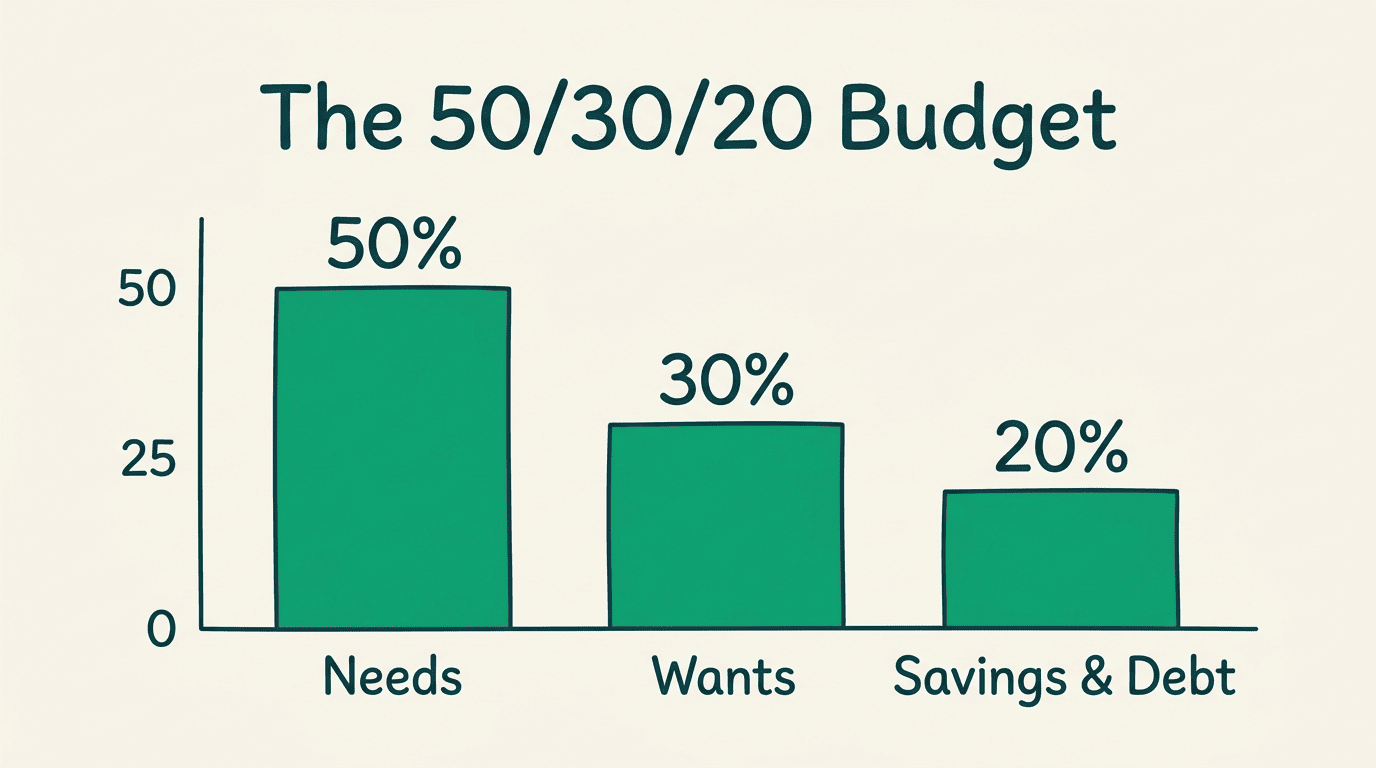
The 50/30/20 rule splits take-home income into three buckets: 50% needs, 30% wants, and 20% savings and debt payoff. It’s simple, flexible, and a good starting point if you’ve never budgeted formally before. Give the AI your rounded take-home number and it can map those figures onto the three buckets and flag when a category is running over. It’s a guideline, not a law — in a high-cost-of-living area, the needs share often runs higher than 50%, and that’s fine to adjust.
Ask the AI to recalculate the split whenever your income or a fixed cost changes, rather than letting an old version quietly go stale. A quick monthly check-in keeps the three buckets honest.
Zero-based budgeting
Zero-based budgeting assigns every dollar of income a job until the running balance hits exactly zero — and savings and debt paydown are explicit line items in that math, not what’s left over after spending. This is a more precise, more hands-on method than 50/30/20. The AI can keep the running total at zero as you allocate dollar by dollar, which makes it easier to catch a category you forgot to fund.
A zero balance is not the same thing as “spend everything.” The whole point is that savings and debt paydown get their own line, just like rent does — the zero only appears once every dollar, including the ones headed to savings, has a job.
Other styles the AI can run
Two other approaches are worth knowing:
- Envelope budgeting — sets a hard cap per category, which suits people who tend to overspend in one specific area.
- Pay-yourself-first — takes savings off the top before anything else gets allocated, so saving never depends on what’s left at month’s end.
Tell the AI explicitly which method you want to use — left unprompted, it will default to one on its own.
| Framework | Best for | How the AI handles it |
|---|---|---|
| 50/30/20 | Beginners, simplicity | Maps rounded income to three fixed percentages |
| Zero-based | Tight control, detail-oriented budgeters | Keeps a running balance at zero as you allocate |
| Envelope | People who overspend in specific categories | Enforces a hard per-category cap |
| Pay-yourself-first | Anyone who wants savings guaranteed | Deducts savings before any other allocation |
Step 4 — Find Savings and Free Up Cash
With categories and a framework in place, the next question is simple: where can you realistically cut without feeling it?
Ask the AI where the money leaks. Prompt it to review your summarized wants and recurring charges and suggest realistic trims, ranked by effort versus impact. These are suggestions based entirely on the numbers you typed in — you’re the one who approves or rejects each cut, not the AI.
Redirect the freed-up money. Once you’ve identified a cut, tell the AI where that freed-up cash should go: the emergency fund, or the highest-interest debt. Two common approaches are worth comparing here — the debt snowball, which pays off the smallest balance first for a motivational win, and the debt avalanche, which targets the highest-APR debt first to save more on interest. The AI can lay out both side by side; neither one is objectively “right” for every situation, so pick the one you’re more likely to stick with.
Step 5 — Build an Emergency Fund With Your AI Advisor
A budget that never accounts for the unexpected tends to fall apart the first time something unexpected happens.
Why the buffer comes first
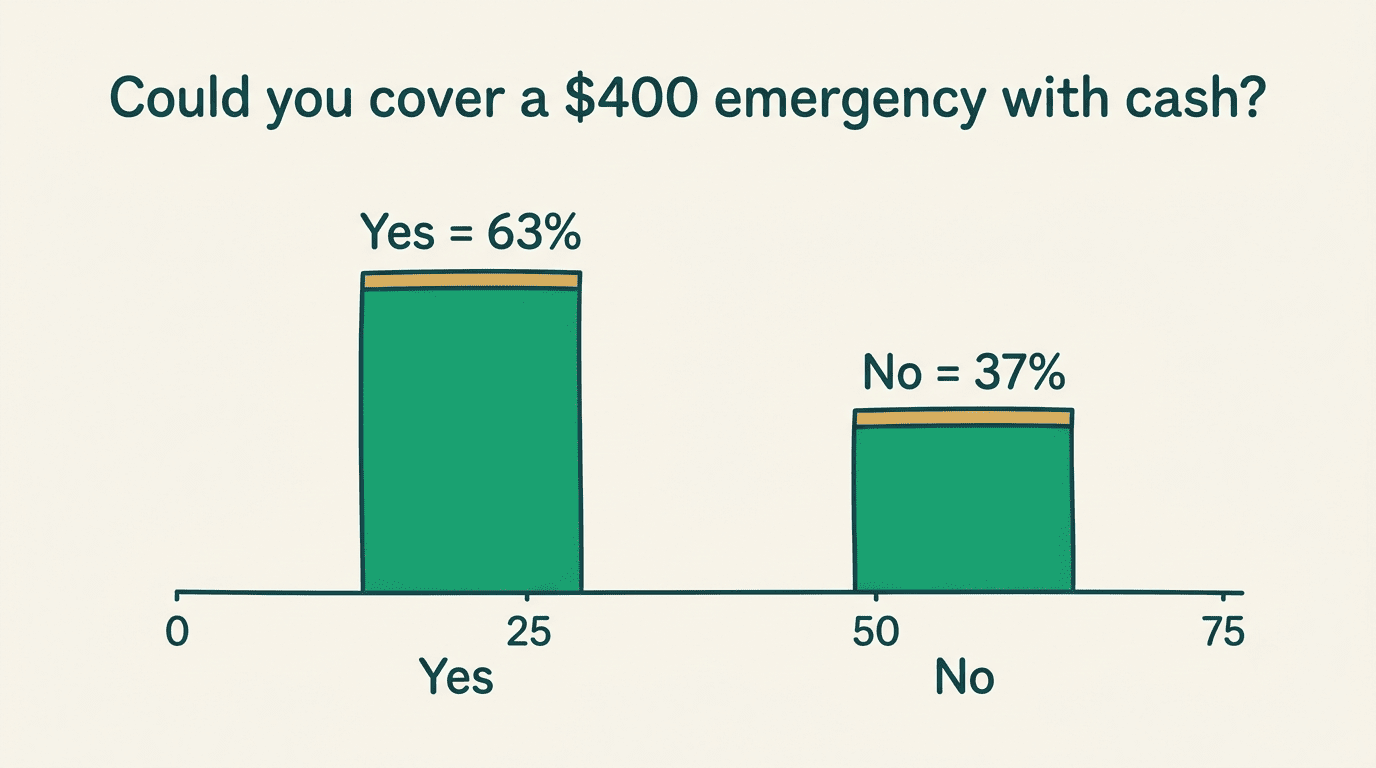
An emergency fund exists to keep a surprise expense from turning into new debt. The scale of the problem is well documented: in the Federal Reserve’s most recent Survey of Household Economics and Decision Making, only 63% of adults said they could cover a hypothetical $400 emergency expense using cash or its equivalent — meaning 37% could not. That gap is exactly what an emergency fund is meant to close, and starting small still counts as starting.
Without a buffer, a car repair or an unplanned medical bill often ends up on a credit card, turning a one-time expense into a recurring interest charge. An AI financial advisor can’t hand you the cash, but it can help you plan around exactly this scenario before it happens.
Let the AI set milestones
Ask the AI to break a savings target into monthly milestones based on your rounded savings capacity. Many financial educators, and resources like the CFPB’s guide to building an emergency fund, frame the goal around 3 to 6 months of essential expenses — though the CFPB itself is careful to note that the right number depends on your situation:
The amount you need to have in an emergency savings fund depends on your situation. Think about the most common kind of unexpected expenses you’ve had in the past and how much they cost. This may help you set a goal for how much you want to have set aside.
Consumer Financial Protection Bureau
Start with a smaller first milestone — even a few hundred dollars — to build momentum before chasing the full target.
Sample AI Prompts for Budgeting
The prompts below use rounded, generic numbers only — swap in your own rounded figures, never exact account balances or statement data.
- “I take home about $3,000 a month. Build me a 50/30/20 budget and list the categories with dollar amounts.”
- “Turn my spending into a zero-based budget: ~$1,000 rent, ~$400 groceries, ~$150 utilities, ~$250 transport, ~$200 subscriptions/dining. Assign every dollar until the balance is zero.”
- “Here are my rough monthly wants: dining out ~$300, streaming ~$60, shopping ~$150. Suggest three realistic cuts ranked by impact.”
- “Break a $1,500 emergency fund goal into monthly milestones if I can save about $150 a month.”
- “Explain the difference between the debt snowball and the debt avalanche method in plain English.”
- “Review this list of my recurring subscriptions and flag any that look redundant or worth cancelling.”
Swap in your own rounded numbers before you send any of these, and double-check the math the AI hands back before you act on it.
The Guardrails: Privacy, Accuracy, and Limits
An AI financial advisor for budgeting is genuinely useful — but only inside a few boundaries that are easy to overlook when the conversation feels casual.
What never to paste into an AI
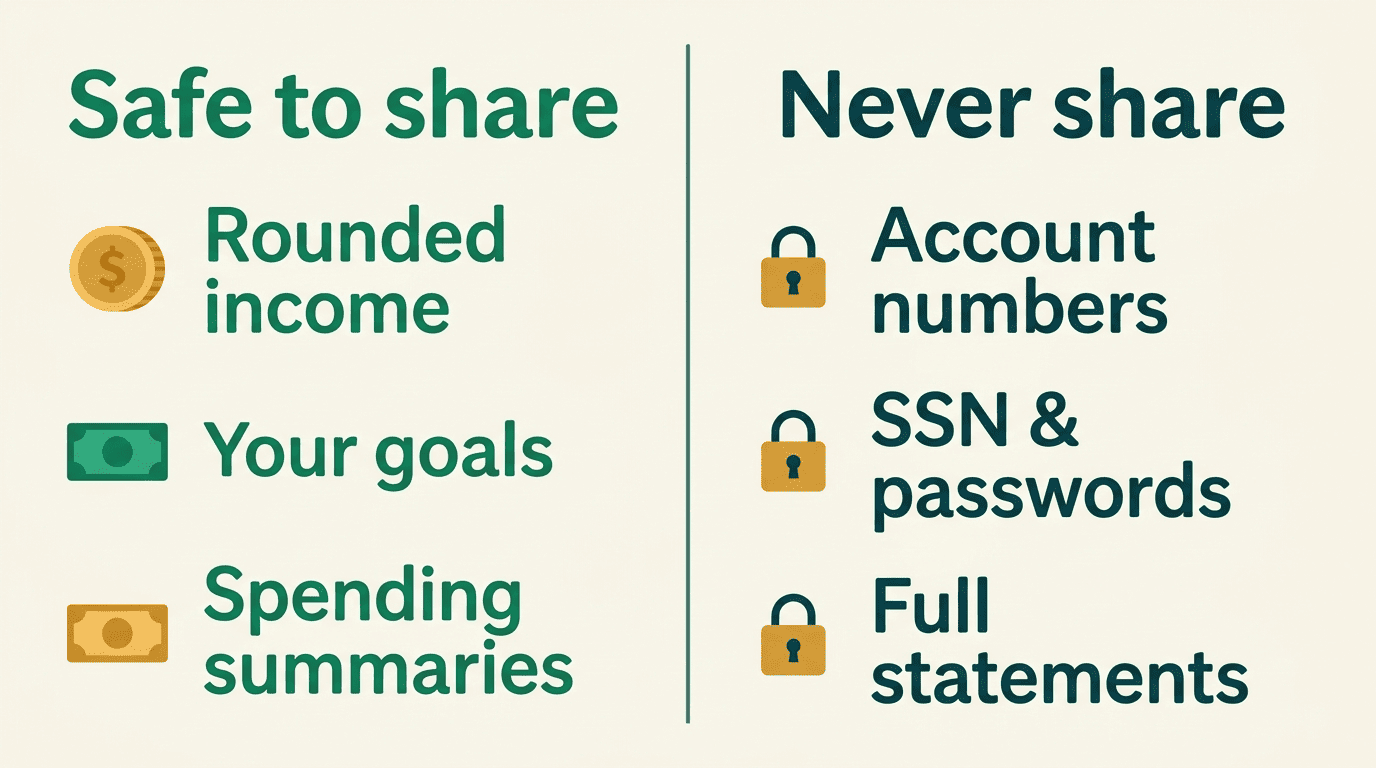
A general-purpose AI chatbot is not a secure vault, and treating it like one is the most common mistake people make when they first try this. Never type any of the following into an AI chat window:
- Bank account or routing numbers
- Card numbers
- Passwords or PINs
- Your Social Security number
- Your full home address or employer ID numbers
- Full account statements or screenshots
Share rounded summaries instead — “about $3,000 a month” tells the AI everything it needs, without exposing anything it doesn’t. For the full picture on protecting this kind of information, see the FTC’s guidance on identity theft and protecting your personal information. This site’s guide to AI financial advisor data privacy goes deeper into what’s safe to share and what isn’t.
Always verify the math
AI tools can miscalculate or “hallucinate” — state a figure that sounds precise but is simply wrong. Recompute totals yourself, or with a calculator, before acting on any budget the AI hands you. The percentages in a 50/30/20 split and the running balance in a zero-based budget both need to actually add up when you check them by hand.
A quick habit helps here: ask the AI to show its arithmetic step by step rather than just the final numbers, so an error is easy to spot instead of buried inside a total. This site’s breakdown of AI financial advisor accuracy covers where these tools tend to get things wrong and how to catch it.
It informs — a licensed advisor advises
An AI budgeting tool is educational software. It is not a licensed fiduciary, and it carries no legal duty to act in your interest. For taxes, investing, insurance, estate planning, or other major life decisions, bring in a professional — Investor.gov (run by the SEC) has guidance on how to check a licensed advisor’s credentials before you hire one.
A Certified Financial Planner (CFP) or another licensed human advisor can look at your full picture — income, debts, taxes, insurance, and goals together — and is accountable for the recommendation in a way no chat window is. Use the AI to get organized and ask better questions; save the decisions that carry real consequences for a professional.
Educational information only — not financial advice, and not a substitute for a licensed financial advisor. Consult a professional before making financial decisions.